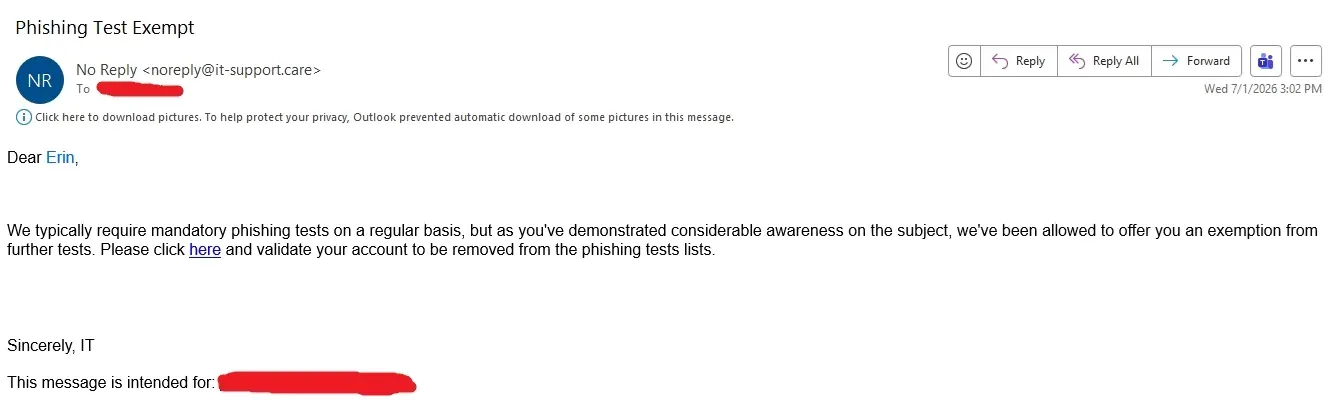
Can’t make the wrong people look bad.
My company: Don’t click on suspicious links.
Also my company: It’s employee survey time, click this link to complete the survey http://surveywhale.com/haidn39fk49cmc93mx
I mark them as phishing attempts every damn time.
Heh, an employee at my work got an email saying his anti-malware was failing to update, and to run http://10.3.4.2/xbejdjr.exe and that they need to click allow when the browser warns them that it is rejected, then right click, run as administrator, and they need to click allow in two other places to let it run.
So he reported as phishing, then IT contacted his manager saying he was failing to help IT run a required update, it was evidently totally legit, but just the most scammy looking way they imagined.
Lol. That’s not sketchy at all. /s
That is so fucking sketchy, I’d have to talk to the IT guy myself or get on a video call to make sure their email or the group chat or whatever wasn’t compromised.
is it tho? that’s a LAN IP, so just a file on the company’s network. browsers whine about http by default bc its security over WAN. then windows just whines about everything
Yes. An average employee doesn’t know the difference between public and private IP’s
This sweet summer child has never experienced the torture that is a LAN virus.
my dog, i’ve been familiar with LAN worms since Limewire. feels like my point here was being missed intentionally
Seems like you missed mine. An .exe somewhere on the LAN is exactly how a worm would replicate.
Please use this link to ensure your security is up to date.
If you told users those are internal and to use them they will quickly forget to verify the link as they were told previously to click on them anyways.
User: I was told links with numbers are OK so I clicked on https://184.147.69.420.ru/spicy.exe, it even said https too!
They can send executable links through emails and get their pants in a twist when the users do the right thing and report it for being shady AF, but they can’t use RMM to automatically install their updates? Bullshit IT department needs to be fully replaced.
10.0.0.0/8 is a reserved lan name space, so I’d probably have ran it after confirming the headers (anything 10.x.x.x will be on your local network) but I do agree, shady and stupid af especially since IT presumably should be running their own dns and it’s trivial to implement a redirect to an internal corporate tld.
I would have assumed a beach head where they compromised a system on the internal network and then phished to extend the reach.
I figured IT of all people would have allocated some DNS and some certificate. I would have taken the lack of TLS and DNS as a consequence of an attacker not having enough access to make those things a reality, and banking on people viewing 10. as safely internal like you are inclined to suggest.
Just because it has an internal address does not mean it is safe, particularly as number of employees goes up and any one of them can get a system under their control compromised.

100% success rate if you mark every email as a phishing attempt.
They don’t track false positives?
In my vast IT experience? No.
I used to report just about any email I got from HR/IT/Executive Management that had a link as spam… I got a lot of interesting replies from IT over the years.
Time to update your benefits SPAM/PHISHING!
Sign up for the holiday “pot luck” SPAM/PHISHING!
Tells us how you feel in thie “anonymous” survey… you guessed it SPAM/PHISHING!
Report the email for phishing attempt.
Uhm. It is the phishing attempt. If you click that link it will tell you, you failed the test. And looking at the comments, a lot of people would fail this test.
… That’s why you would report the email as a phishing attempt.
I take great pleasure in flagging the training emails from my company’s IT contractor as phishing emails. After all, they’re unexpected emails with big link that I simply must quickly click on. That sounds like phishing to me!
lvfp6r7ghe1ij8mero5mlf141zvhbzzbojgo9o5whrqvdobeq5x9sw16 k1sfuaird1jys1ppfvzs49z0tgf2ekusizgug0kfoqgl52tn48rj8 o4k02gig3lnp8l2b tczs0q9tijhd9vchnldvcruhp4sbneqmn 5kk6pts7bm8vcax4mj6cqr0ree45ytlh8gbmiffm68cks1jfkm3z9k
Fun fact, those fishing emails usually share header information unique to the phishing email test service.
Yeah, I used to see these when I worked at a big corp. I would do a whois search on the domains used and 9/10 times it would come back as some compliance contractor the company used. I then proceeded to roll my rolly chair up and down every aisle warning my engineers. I spent so much time rolling in that job they should have bought me a rascal scooter with a built in desk. :D
We once had one that had what looked like a user ID in the URL. Checked with a coworker. The IDs appeared to be given sequentially. So I copied the URL and visited the site many times with different IDs.
A lot of people failed the phishing test that month and would deny it.
That is exactly how I phish (ha) them out as they hit my inbox!
Ive often suggested to our security team that they send one out spoofing the monthly mandatory training vid
The issue is that people’s egos get bruised when they fall for it, and they’ll very quickly get management on their side that certain ones are unfair, as if phishers give a shit about fair.
What I really love is how my workplace uses some man in the middle crap to replace every link in every email with a new one redirected through our cyber security link scanning product, so now there’s no way to check the actual link before you click it since they’re all just like
garbagesec.com/4a12c89e7fnow.In my experience, its usually upper management that fails the phishing attempts.
Our IT solution to that was to MITM all the links except for the phishing tests. So anyone savvy enough to realize that always passes.
Ours seems to set a header like X-Phishing-Test on the email so it’s trivially easy to get them right every time
I have a rule that searches the email headers for the test emails and just deletes them.
If IT did the phishing tests nobody would stand a chance lol
I’d always pass because I never look at any of my emails. Checkmate, IT department
I’ve setup a filter based on email headers that include ‘Phishing_Training’ lol, can’t be asked