f00f/eris
Here to follow content related to Star Trek, Linux, open-source software, and anything else I like that happens to have a substantial Lemmy community for it.
Main fediverse account: @f00fc7c8@woem.space
- 3 Posts
- 88 Comments
Joined 3 years ago
Cake day: August 4th, 2023
You are not logged in. If you use a Fediverse account that is able to follow users, you can follow this user.
Going by their Mastodon account, seems they were erroneously detected as “from a US-sanctioned region” and it took too long for said error to be resolved, so they just made the switch.


I’m not a classic Linuxer (I switched in 2015) but I did once try Mandrake out of historical curiosity. From what I hear it was the recommended “beginner-friendly” distro before Ubuntu came out. And based on how hard it was to get working on a VM, I now understand why classic Linuxers talk about Ubuntu like it was this huge sea change.
 3·2 years ago
I’d say they all offer different types of customization. It’s less a matter of how much you can do, and more a matter of what you want to do and how much time you’re willing to spend working on it. KDE is for people who want to customize their desktop, and want it to be easy to do so. GNOME is for people who just want something that works, but it still offers a lot of customization, it’s just not as well-supported (their philosophy is “if theming breaks an app, it’s not our fault”).
KDE doesn’t support full CSS customization on its own, but there are theming engines like Kvantum and QtCurve that address the limitations that arise from this. I’d say it’s on almost equal footing with GNOME in that regard, since both GTK4+libadwaita and Qt6+KF6 are designed for color scheme customization, but require various workarounds and obscure settings for anything more than that. If anything the workarounds are easier in KDE.
Similarly, KDE supports layout customization through widgets and graphical menus. GNOME also supports layout customization, but through extensions instead.
And then you can do all of the above and more if you use a window manager, or an LXDE/LXQt-style desktop that lets you disable or replace all its components in settings - just mix and match components like panels, file managers, display managers, polkit agents, etc. You can basically build your own DE that way, and it doesn’t get much more customizable than that. But maybe you don’t want to spend your time choosing every component of your custom DE. That’s what something like KDE is for.
It’s nice that major news outlets are saying what we nerds have been screaming for the past two decades. Microsoft only shares a small portion of the blame for the recent outage (they could have built their OS better so software vendors don’t feel the need to use kernel modules, but the rest is on CrowdStrike) but we are too depenent on them.
 2·2 years ago
If my American university has a system in place for students that don’t own Windows, I would not be surprised if yours has a better one :)
LibreOffice has opened every DOC(X) the school has sent me, albeit imperfectly, and all assignments are turned in as PDFs, which I usually make using Markdown and LaTeX. I have had to use Office 365 for collaboration, but only about twice a year, and that runs very smoothly in Firefox. On one occasion I tried to collaborate with CryptPad, but it didn’t work as well as I hoped.
Most computer labs at my uni run Windows 10, rarely 11, but a lot of the science labs run Linux. A surprising amount of the software required for classes has been open-source, too.
The most frustrating thing has been the lockdown browser used for some exams. My university library has computers I can borrow for exams, but yours might not, and they detect VMs, so you might have to dual boot for that.
 11·2 years ago
Yeah, only thing I can think of is the few banking apps that don’t have web versions.
I was lucky enough to have all my banking and 2FA apps work perfectly on GrapheneOS. The only app that gave me a significant amount of trouble was iClicker, which my school uses for attendance. That was fixed by enabling Google Play location services, and there was a (fairly expensive) alternative anyway.
I did have to buy a new phone to use Graphene, because I got my previous one as part of a carrier’s cell plan, and it had a locked BIOS. Though I think the purchase was worth it, and just moving my SIM card from one device to another was enough to get it working.
 13·2 years ago
From what I’ve heard uBlock Origin Lite only barely falls short of the ad-blocking coverage that regular uBO offers, so there will still be options for Chrome users after this happens, not to mention the multitude of alternative browsers and app stores for Android.
I still think that making Linux phones a viable alternative is very important, but it’s not significantly more important now than it was a month ago.
of course not!
I don’t have much PC building experience, but these specs seem sufficient. Only comment is that you might need to use a distro with a new-ish kernel and graphics stack, given the very recent CPU and GPU. So not Debian stable, but Fedora, Ubuntu, or any rolling release distro will be fine.
 14·2 years ago
For a while I daily drove a Purism Librem 14 with Debian’s fully free kernel, and installed as few non-free packages as possible, including firmware blobs (which I didn’t install any of until I decided I needed Bluetooth). My experience with gaming was generally fine.
With linux-libre you really have to buy your hardware specifically with support in mind. You’re limited to Intel and non-bleeding-edge AMD graphics cards, a very small range of wifi cards, and no Bluetooth. Otherwise, video games should work as well as they would on any other computers with the same specs. Especially if you’re also limiting yourself to games with free engines - I’m not aware of a single libre game that demands more than a modern Intel integrated graphics card can provide, even on high settings.
 5·2 years ago
Handbrake will probably still work if you compile it from source, but it seems like upstream isn’t paying much attention to libdvdcss support.
The version in Debian’s repo still works for me, anyway.
 81·2 years ago
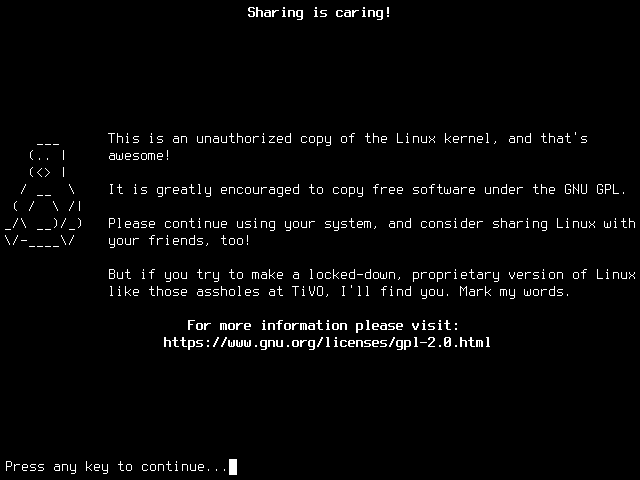
Yeah, it’s fake, and as other commenters have pointed out, it’s also inaccurate to how the GPLv2 works. It was not meant to convince anyone.
I came across a bunch of those recently, which is how I came up with the idea for this, as a parody :)
Internet horror is disappointingly un-creative. I have no idea why the weakest works (sonic.exe, anti-piracy, kill screens) always end up becoming huge trends, or why so few people try to put a significant twist on said trends.
Tons of companies are shipping Linux without giving users access to the source code, it’s just that only one has the term “Tivoization” named after it.
 2·2 years ago
Where’d you get the OneShot Firefox icon?
 1·2 years ago
I’ll probably use Codeberg or another Forgejo server for my next programming project, if/when I have one that is far enough along to publish (motivating myself to get that far is a tall task). Until then, everything I’d consider contributing to is either on GitHub, or is self-hosting some other software, so I don’t have a reason to create an account yet.
If you haven’t set up this laptop yet, then I’d suggest installing a server-oriented distro like Debian, AlmaLinux, or Ubuntu Server. Those have minimal install options that come without a desktop environment installed, as most servers do not need one. If you’d like to make the install harder for yourself, this might be a good excuse to give Arch Linux or Gentoo a try, as those have the option of a fully manual install. If you’d like, you can install a desktop environment afterwards using the package manager.
If you already have a Linux with a graphical desktop installed, you can configure the system not to automatically start it with
sudo systemctl set-default multi-user.target. (Do not do this on your main device!) You can re-enable it withsudo systemctl set-default graphical.target.Regardless, you can then start a graphical session using
startx, or whatever command is more appropriate for your desktop environment (gnome-sessionto start GNOME on Wayland,startplasma-waylandto start KDE Plasma), or bysudo systemctl starting your login screen manager (sddm, gdm, lightdm, etc).
Just as long as it isn’t a .rar.